
Quick summary
Wondering whether to go with Respond.io or Wati? Let’s help you decide.
Respond.io and Wati both provide access to the WhatsApp Business API, but they cater to different types of businesses. Respond.io is better suited for mid-market and larger businesses that want to manage conversations across multiple messaging channels, while Wati is commonly used by small to mid-sized businesses looking for a WhatsApp-only setup for marketing, customer support, and workflow automation.
That said, Wati applies a markup on WhatsApp API costs and requires users to pre-purchase messaging credits. Respond.io, on the other hand, does not include essential features like WhatsApp broadcasts in its $99/month Starter plan. Both platforms can also become significantly more expensive as your usage and team size scale.
That’s where WANotifier comes into the picture. Built specifically for WhatsApp marketing and automation, it offers 0% markup on API charges, a transparent pricing model, and best-in-class customer support, so your business can grow on WhatsApp without unnecessary overhead.
Want to give WANotifier a try? Start your 7-day free trial today!

Respond.io

Respond.io is an omnichannel messaging platform that enables businesses to manage conversations across multiple channels, including WhatsApp. While it offers powerful tools for sales and support teams, Respond.io’s multi-channel approach can be overwhelming for businesses seeking a more straightforward, WhatsApp-focused marketing solution.

Wati

Wati is a go-to platform for businesses that want to scale customer conversations on WhatsApp. With tools like bulk campaigns, Click-to-WhatsApp ads, chatbots, WhatsApp Flows, and Astra AI agents, Wati helps brands deliver timely and personalized messages while streamlining customer support.

Core differentiators
Respond.io core differentiators
Key features
- WhatsApp bulk broadcasts (Growth plan and above)
- Omnichannel team inbox
- Workflow automation and AI agents (Growth plan and above)
- CRM-style contact management
- Analytics and reporting tools
Pros
- No markup on WhatsApp’s messaging rates (you pay Meta’s rates)
- Unified inbox for WhatsApp, email, Facebook, Instagram, TikTok, and other channels
- 24/7 human and AI support on every plan
- Direct CRM integrations with HubSpot and Salesforce
Cons
- Can feel overwhelming for users who only want to focus on WhatsApp
- Too expensive for small teams
- Starter plan ($99/month) does not include broadcasts, workflow automation, or AI agents (WhatsApp-focused users must upgrade to the $199/month Growth plan for essential features)
- Requires a prepaid WhatsApp balance (top-ups of $10 to $2,000), normally subject to a 5.5% processing fee (waived since October 2026 until further notice)
- Number masking and SSO are only available on the Advanced plan and above
- Guided onboarding program is a paid add-on
Supported integrations
- HubSpot
- Salesforce
- ActiveCampaign (via Zapier)
- Pipedrive (via Zapier)
- Zapier and Make (Growth plan and above)
…and more
Best for
Mid-market and enterprise businesses that want to manage conversations across multiple channels and can absorb the higher subscription costs.
Wati core differentiators
Key features
- Broadcast campaigns
- Easy-to-use no-code chatbot builder
- WhatsApp Flows and retargeting automations (retargeting on Pro and Business plans only)
- Click-to-WhatsApp ads
- Astra AI agents for sales and support
Pros
- Powerful automation features, including AI agents and a no-code chatbot builder
- Integrates easily with popular CRM, ecommerce, and other third-party platforms
- Offers email support across all plans, with 24×7 chat support on Pro and Business
- Onboarding support included with annual subscriptions
Cons
- Adds a 12% to 20% markup on WhatsApp’s official messaging rates depending on the plan (₹1.0357 per marketing message on the Growth plan vs. Meta’s official ₹0.8631 rate in India)
- Requires users to pre-purchase messaging credits (minimum wallet balance of ₹500 / $10)
- Growth plan includes only 3 users with no option to add more; Pro and Business include 5 users, and additional seats cost $39 to $89 (₹1,299 to ₹2,199) per user per month
- Growth plan is capped at 15,000 broadcasts per month and 2 integrations; retargeting and advanced campaign analytics require Pro or Business
- Onboarding support is a paid add-on on monthly and quarterly billing (included only with annual plans)
Supported integrations
- Salesforce (Business plan)
- HubSpot (Pro plan and above)
- Zapier
- Zoho CRM
- Shopify (paid add-on at $4.99 per month)
- WooCommerce
…and more (the Growth plan is limited to 2 integrations and Pro to 5)
Best for
Mid- to large-sized businesses that want a scalable WhatsApp automation solution and can absorb higher messaging costs.
Pricing
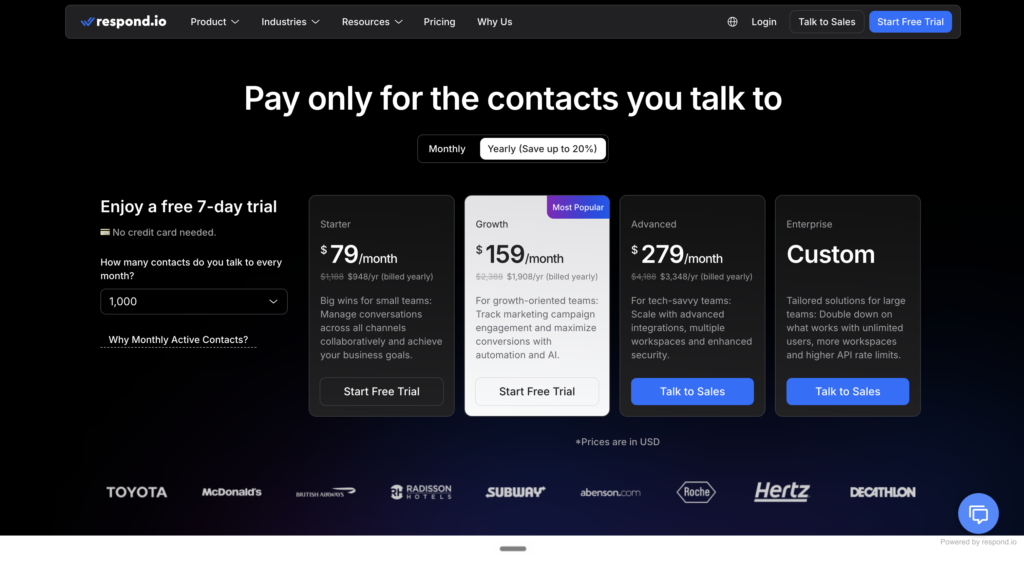
Respond.io pricing
(Prices as of November 2026. WhatsApp messaging charges are billed separately at Meta’s rates from a prepaid balance)
Free Trial: Yes (7-day free trial of the Growth plan, no credit card required)
Subscription Options: Monthly and yearly billing (up to 20% off on yearly)
Plans (per month):
- Starter: $99 per month (5 users, unlimited contacts)
- Growth: $199 per month (10 users, 1,000 monthly active contacts)
- Advanced: $349 per month (10 users, 1,000 monthly active contacts)
- Enterprise: Custom pricing
Wati pricing
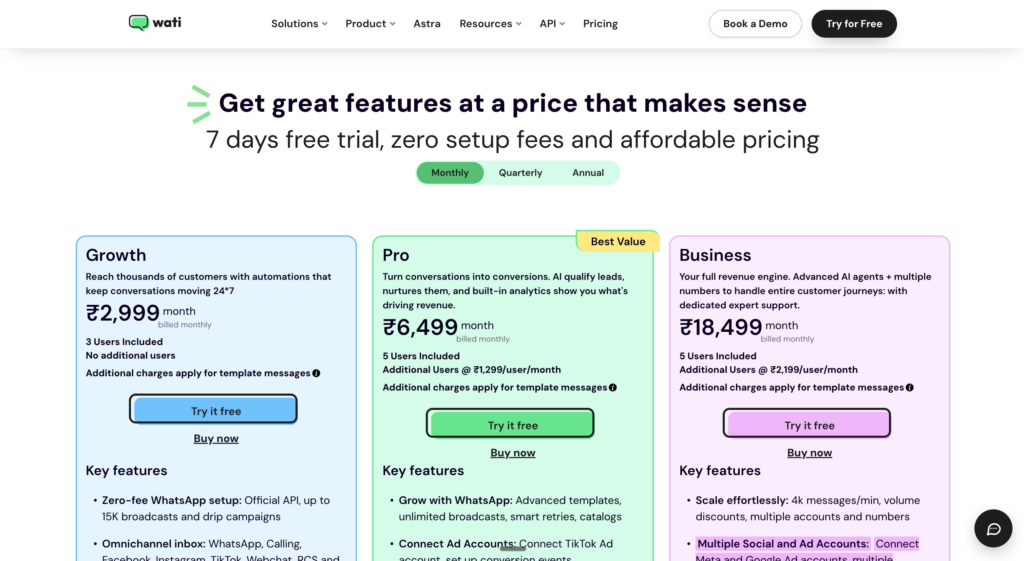
(Prices as of November 2026. Messaging charges include a markup and are billed separately)
Free Trial: Yes (7-day free trial, no credit card required)
Subscription Options: Monthly, quarterly, and yearly billing (quarterly and yearly plans are discounted)
Plans (per month):
- Growth: $69 / ₹2,999 per month
- Pro: $149 / ₹6,499 per month
- Business: $349 / ₹18,499 per month
Pay-as-you-go Plan:
- ₹999 one-time (includes 500 WhatsApp messages valid for 3 months; single user, India only)
Support
Respond.io support options
Customer support
- 24/7 human and AI chat support (for all users)
- Scheduled success calls (for all users)
- Dedicated success manager (for Enterprise users)
Onboarding
Respond.io includes an in-product onboarding guide and documentation on every plan, but its 28-day guided onboarding program is a paid add-on (subject to availability).
Wati support options
Customer support
- Support documentation
- Email support (24×5 on Growth; 24×7 on Pro and Business)
- Chat support (only for Pro and Business users)
- Priority support (only for Business users)
- Dedicated customer success manager (only for Business users)
Onboarding
Wati includes onboarding support only with annual subscriptions. Users on monthly or quarterly billing can purchase dedicated onboarding and custom setup as a one-time paid add-on.