WhatsApp has over 3 billion monthly active users and open rates of up to 90%.
When businesses see this level of attention and engagement, they often wonder, “
Why not run marketing campaigns on WhatsApp just like we do on SMS, email, or other channels?”
But here’s something most businesses don’t understand: WhatsApp doesn’t work like email, SMS, or other marketing channels. You can’t just upload a contact list and blast thousands of WhatsApp messages whenever you feel like it.
If you do, you not only risk being flagged as spam but also having your number restricted or, in serious cases, permanently blocked on the platform.
So how do you run WhatsApp marketing campaigns at scale and drive high engagement without risking your phone number or brand reputation?
That’s exactly what this guide will help you figure out.
By the end, you’ll know how to send effective WhatsApp marketing campaigns to thousands of contacts in one go without violating WhatsApp’s policies. Here’s what we’ll cover:
- The types of marketing campaigns you can run on WhatsApp
- The different ways to execute them
- How to scale your WhatsApp marketing campaigns using the WhatsApp API
- How to monitor campaign performance
- And finally, the best practices to boost your engagement rates
But first, let’s go over the basics.
How WhatsApp Marketing Campaigns Actually Work
A WhatsApp marketing campaign typically involves sending a single message, or a series of messages, to customers to promote something or drive a specific action, such as:
- Completing a purchase
- Signing up for a service
- Booking a demo or appointment
- Filling out a form or survey
… and more.
At first glance, this may seem similar to running a marketing campaign on other platforms like SMS or email. However, WhatsApp works a little differently because it takes into account how users respond to your messages.
If too many people block your phone number or report your messages as spam, WhatsApp can temporarily restrict your account, or, in serious cases, impose a permanent ban. However, if users continue to engage with your messages and don’t report them as unwanted, you’ll retain the ability to send messages at scale.
So, in a nutshell, WhatsApp marketing campaigns operate within a feedback loop. Businesses send messages, users react to them, and those reactions influence how easily businesses can continue sending messages in the future.
Now that you understand how marketing campaigns work on WhatsApp, let’s take a quick look at the most common types of campaigns you can run.
4 Types of Marketing Campaigns You Can Run on WhatsApp
WhatsApp marketing campaigns can serve different purposes depending on where your customers are in their journey. Below are four common campaign types businesses use to engage customers at different stages:
1. Promotional Campaigns
Promotional campaigns are the most common type of WhatsApp marketing campaign and are designed to drive immediate action. Businesses typically run them to promote things like:
- Product launches
- Flash sales
- Seasonal promotions such as Black Friday, Diwali, or Christmas sales
…and other time-sensitive offers or special deals.
2. Lead Nurturing Campaigns
These campaigns help you stay in touch with prospects and gradually move them closer to a purchase. On WhatsApp, you can nurture leads using:
- One-time messages, or
- Drip campaigns, consisting of several messages sent over a specific period of time
Some other ways you can nurture leads include:
- Sending automated follow-up messages after someone signs up on your website or app, submits a form, or shows interest in your product
- Sending reminder messages encouraging prospects to complete an action, such as finishing a signup process
3. Re-Engagement Campaigns
These campaigns help you reconnect with customers who haven’t interacted with your business in a while or who abandoned a purchase before completing checkout. Common examples include:
- Abandoned cart reminders
- Special discount offers for inactive customers
- “We miss you” messages encouraging customers to return
4. Post-Purchase Campaigns
Post-purchase campaigns can be used to engage customers after they’ve completed a purchase. They are usually implemented to increase customer lifetime value and boost relationships with buyers. Common examples include:
- Cross-selling products (or recommending items related to a customer’s purchase)
- Refill or reorder reminders, prompting customers to replenish products they may be running low on
- Requests for product reviews or feedback
Send promotional broadcasts, nurture leads with drip campaigns, and re-engage customers using WANotifier.
Different Ways to Run Campaigns on WhatsApp
Businesses can run marketing campaigns on WhatsApp using either of the following solutions:
1) WhatsApp Business App
The WhatsApp Business App is a free app designed for individuals and small businesses to send basic WhatsApp campaigns directly from their phones. It supports broadcasts and basic automations.
That said, the app has some notable limitations. For example, it limits broadcasts to 256 contacts at a time and does not support advanced automation, chatbots, third-party integrations, or multi-agent access. Reporting and analytics are also limited, which makes it harder to measure campaign performance.
2) WhatsApp Business API
The WhatsApp Business API is designed for businesses that want to run WhatsApp campaigns at scale, and supports unlimited messaging (depending on your account’s quality rating).
The API allows businesses to set up advanced automations such as chatbots and keyword-triggered auto-replies. It also enables multiple team members to manage conversations from the same WhatsApp number and integrates with third-party tools like CRMs and marketing platforms.
Finally, the API also provides access to more advanced reporting tools, which help businesses monitor campaign performance and optimize their messaging strategy.
The table below outlines how both solutions differ:
| Feature | WhatsApp Business App | WhatsApp Business API |
| Messaging limit | 256 contacts at a time | Unlimited |
| Auto-replies | Basic (greeting and away messages) | Basic + advanced keyword-triggered auto-replies |
| Chatbots | ❌ Not supported | ✅ Supported (rule-based or AI-powered chatbots) |
| Analytics | Limited | Detailed delivery, engagement, and performance analytics |
| Third-party integrations | ❌ Not supported | Can integrate with CRMs, marketing tools, and other systems |
| Multi-agent support | Limited (Up to 5 devices with 1 phone + 4 linked devices) | Supports multiple users and teams working from the same number |
As you can see, both solutions allow businesses to communicate with customers on WhatsApp. That said, if you want to run marketing campaigns at scale, automate messaging, track performance, and manage conversations across teams, the WhatsApp Business API is the clear winner.
That’s why I’ll now walk you through a step-by-step guide on how to create a marketing campaign using the WhatsApp API.
How to Create and Send a Marketing Campaign at Scale Using the WhatsApp API
While the WhatsApp Business API enables high-volume messaging, advanced automation, and other powerful capabilities, it doesn’t come with a built-in dashboard or user interface that businesses can use directly.
To access these features, businesses typically use a third-party platform, like WANotifier, which provides a complete WhatsApp marketing and automation solution and lets you create, manage, and send WhatsApp campaigns without writing a single line of code!
Below is a step-by-step guide to running WhatsApp marketing campaigns using the API with WANotifier (other platforms may follow a similar process):
Step 1: Create Your WANotifier Account
To get started, you first need to create your WANotifier account and set up your phone number with WhatsApp API. You can follow this detailed guide to complete the setup.
Once your account is connected and the API setup is complete, you’ll be redirected to your WANotifier dashboard. From there, you’re ready to move on to the next step.
Step 2: Upload and Segment Your Contacts
Click on Contacts in the left sidebar and select the Import / Export option.
You’ll be taken to the following screen:
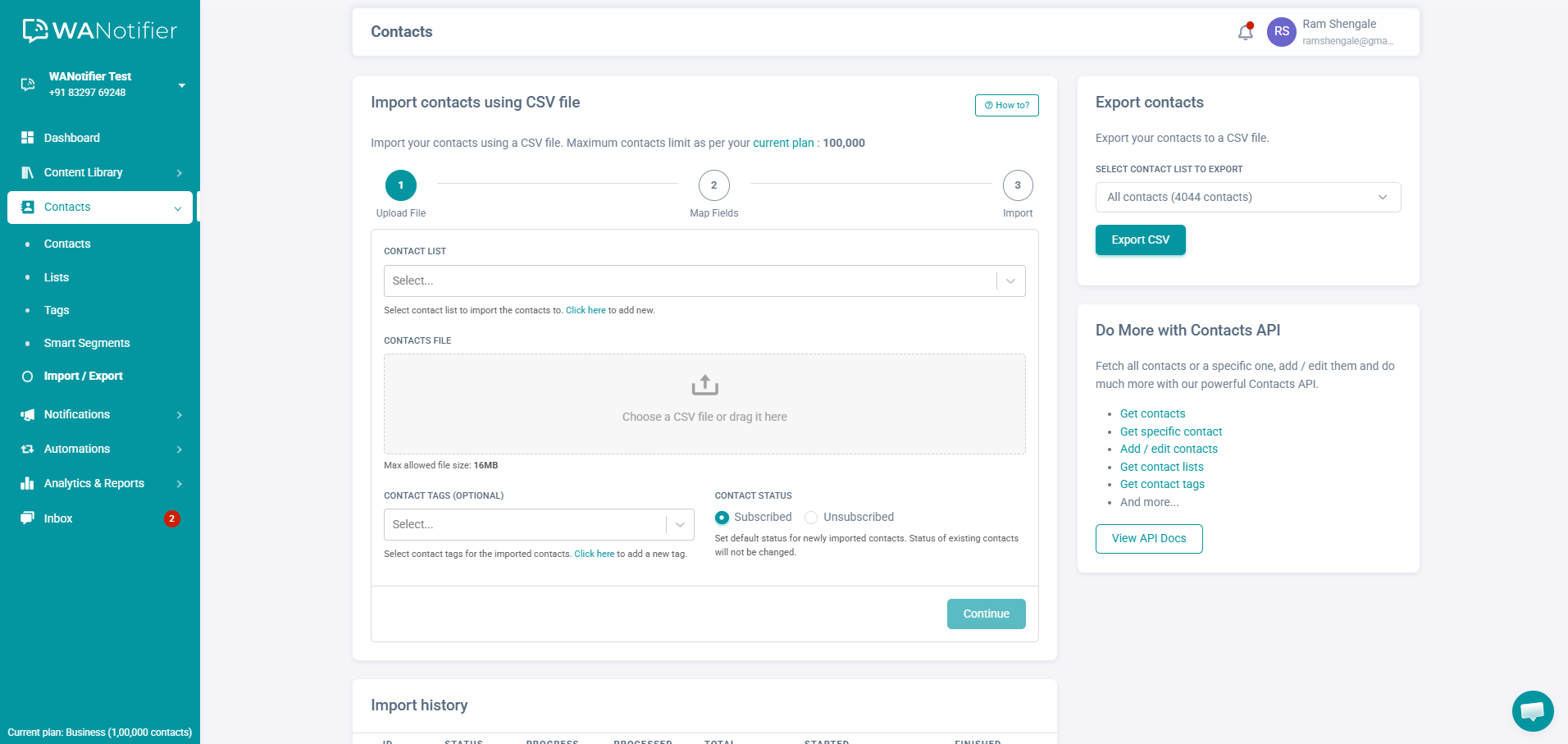
Here, you can import your contacts using a CSV or Excel file. Alternatively, you can import contacts using our Contacts API.
Note that you can also add contacts manually. To do this, go to Contacts and click Add New in the top-right corner. This opens a pop-up where you can enter the contact’s details, select the list they should be added to, and apply tags or custom attributes.
Once your contacts are uploaded, you can filter them by tags or by their status (subscribed or unsubscribed and saved or unsaved).
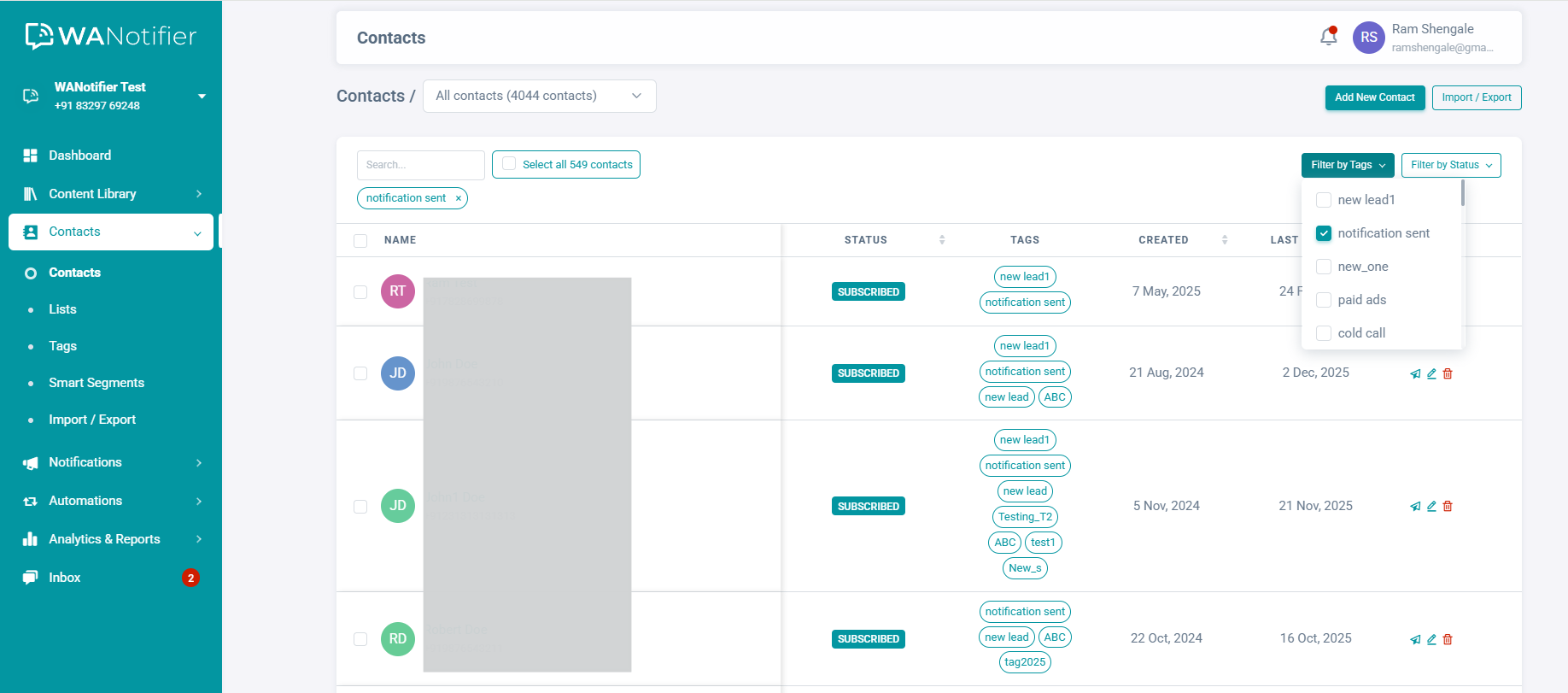
You can also create dynamic Smart Segments using filters based on lists, tags, and custom attributes to send more targeted campaigns.
Step 3: Create a Marketing Message Template
Now that you’ve added and segmented your contacts, the next step is to create a message template. Templates allow you to reuse the same message across multiple campaigns and send it to different contact lists.
To get started, click on Content Library in the left sidebar and select the Message Templates option. This will take you to the template dashboard.
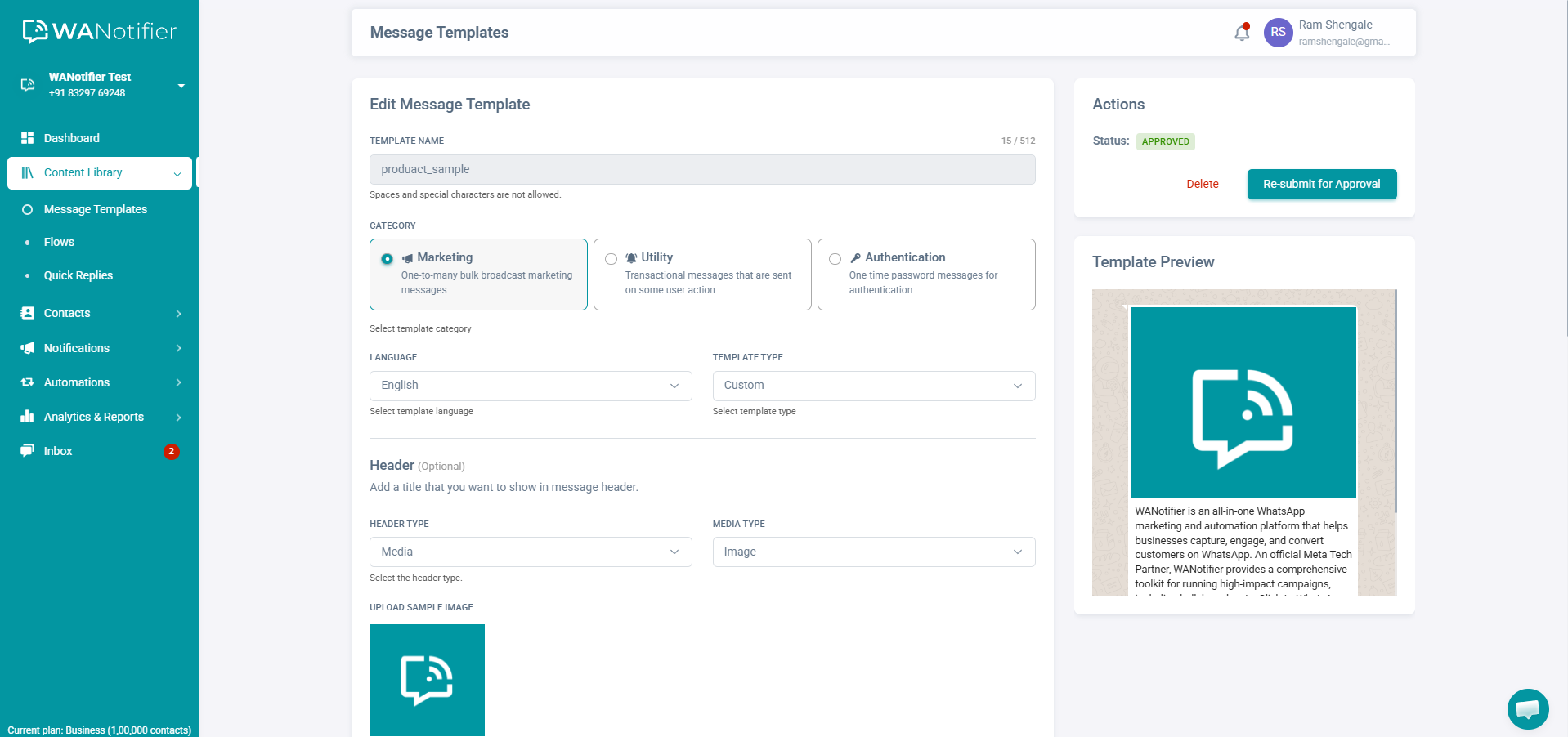
Once you’re there, follow this in-depth guide to create a template using text, images, videos, and CTA buttons.
When you’re satisfied with the template, hit the submit button to send it for WhatsApp’s approval. Note that the review process typically takes anywhere between 30 minutes and 48 hours, and the template cannot be used in campaigns until it has been approved.
Step 4: Create a New WhatsApp Campaign
You’re now ready to send or schedule your first WhatsApp marketing campaign.
To get started, click on Notifications in the left sidebar and select the Add New option. This will take you to the following screen:
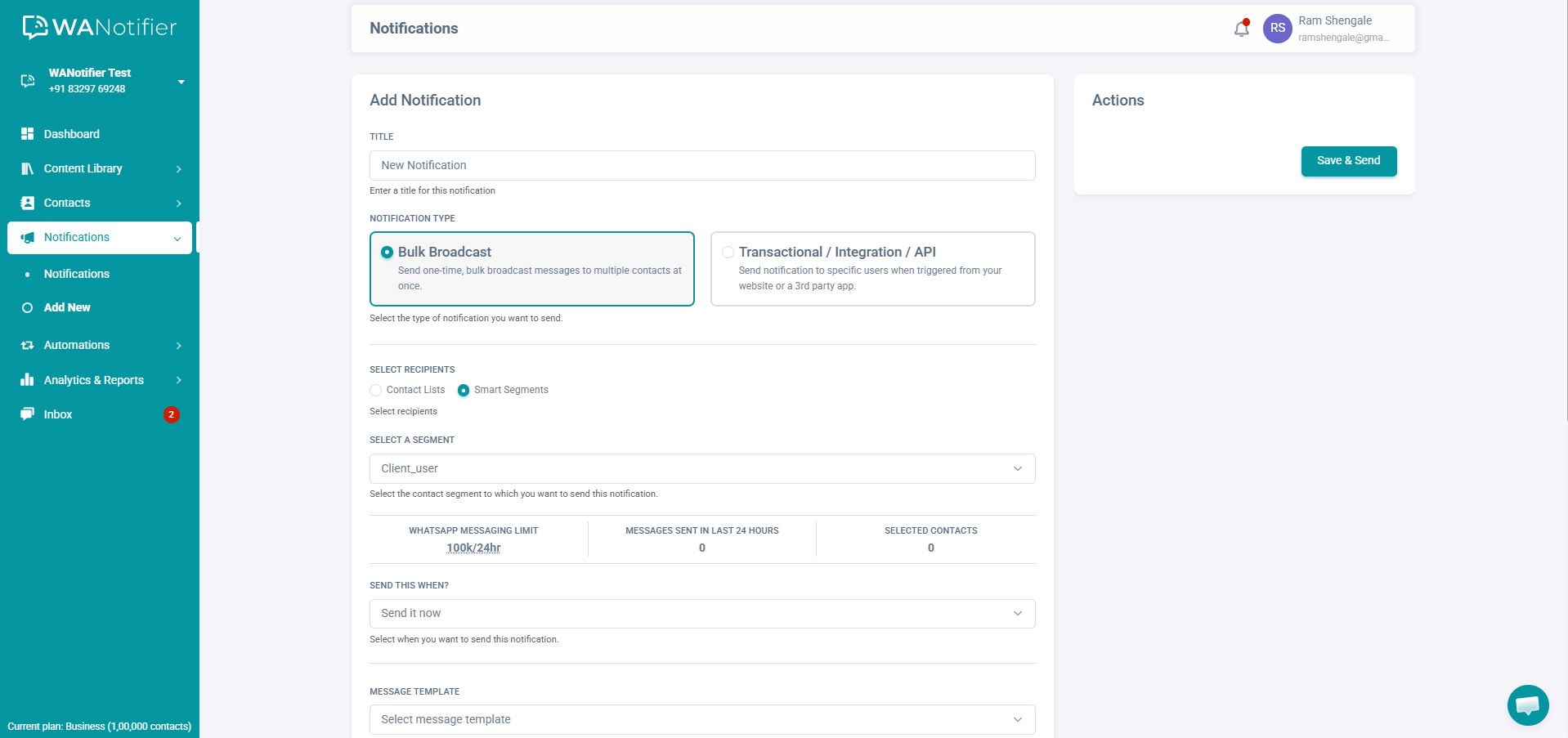
Start by giving your campaign a name or title. Then, under Notification Type, select Bulk Broadcast notification.
Next, choose the contact list or segment you want to send the campaign to.
- You can select a contact list and use the Include / Exclude Tags option to filter specific contacts within that list
- Or, you can select a Smart Segment created in Step 2 to target a specific audience
Then, choose when to send your campaign; you can send it immediately or schedule it for later.
After that, select your WhatsApp-approved message template from the dropdown. You can also retry sending failed campaign messages (up to three times) and automatically unsubscribe contacts if a message fails to deliver using Advanced Settings.
Once everything is configured, click Save & Send.
And that’s it. You’ve just sent (or scheduled) a WhatsApp marketing campaign.
Note: If you want to send a series of messages over time rather than just one, you can create a drip campaign using this comprehensive guide.
Use WANotifier to segment your audience and launch targeted WhatsApp campaigns in minutes.
How to Measure Campaign Performance
Once your WhatsApp campaigns are up and running, the next step is to monitor their performance. In WANotifier, you can do this using the Analytics and Reports section.
Analyzing Campaign Performance
To view campaign-level metrics, click on Analytics & Reports in the left sidebar and select the Notifications option. This will open the campaign analytics dashboard.
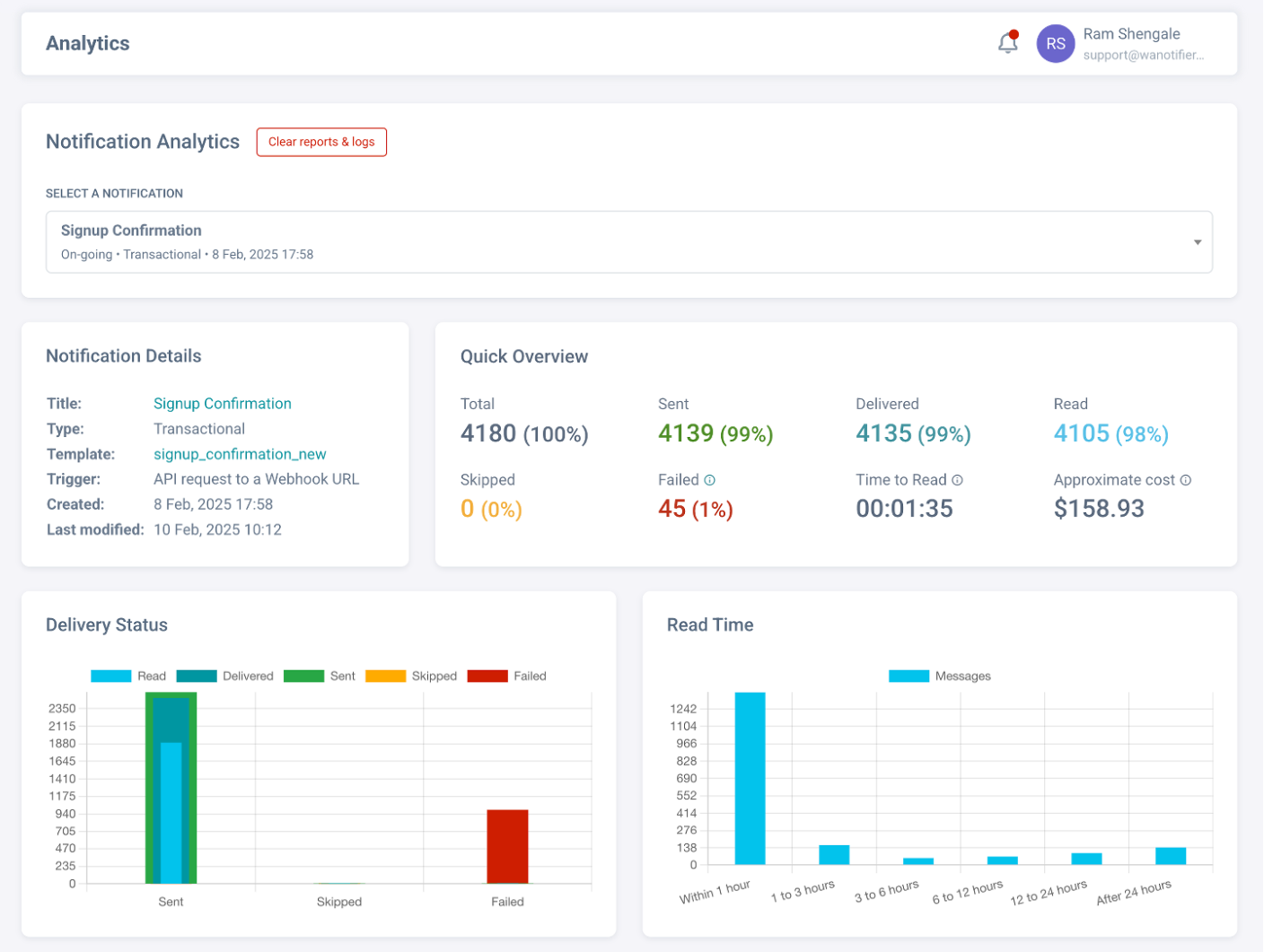
On this screen, you can select any campaign from the dropdown at the top to view its analytics.
Some key metrics you can monitor here include:
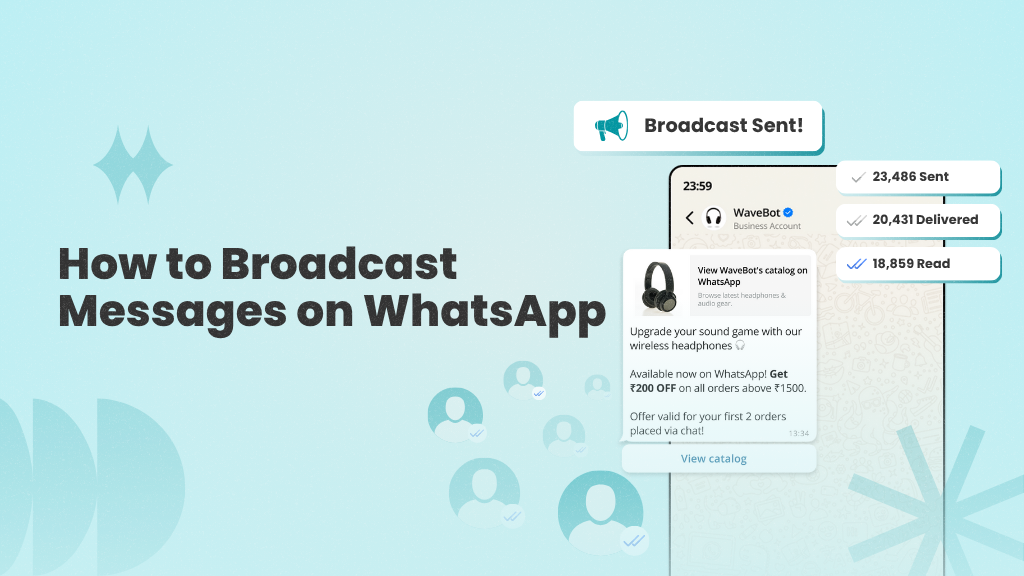
- Delivery Status: This shows how many messages were successfully delivered and read, and how many failed. You can also view detailed delivery reports and activity logs to understand why certain messages failed, along with their corresponding error codes.
- Read Time: This metric shows how long it took for a contact to read your message after it was sent.
- Replies: The number of contacts who replied after receiving the campaign message.
- Approximate Cost: The estimated total cost of sending messages for that particular campaign.
Monitoring Template Performance
In addition to campaign analytics, you can also monitor how individual message templates are performing.
To do this, go to Analytics and Reports and select Message Templates.
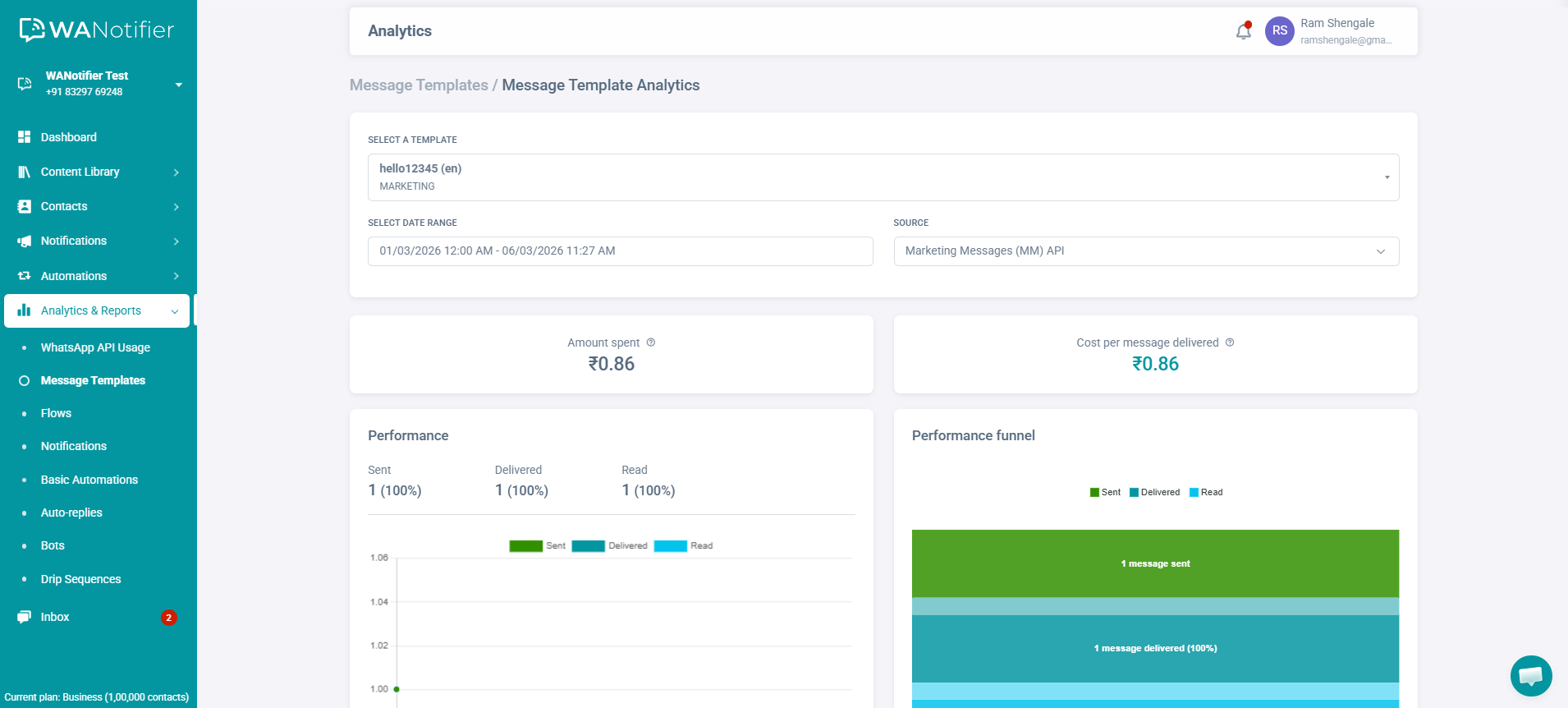
On this page, you can choose a specific template and date range to analyze how that template performed during that period. Note that this dashboard allows you to review performance for templates sent using either the Cloud API or the MM API.
Key metrics you can monitor here include:
- Delivery rate
- Read rate
- Cost per template
If you’re using the MM Lite API, you can also compare your template’s performance with similar templates.
Tracking Drip Campaign Metrics
If you’re using drip campaigns to nurture or engage leads, you can track how recipients are interacting with them using WANotifier’s Drip Sequence Analytics dashboard.
To access it, go to Analytics & Reports in the left sidebar and select Drip Sequence.
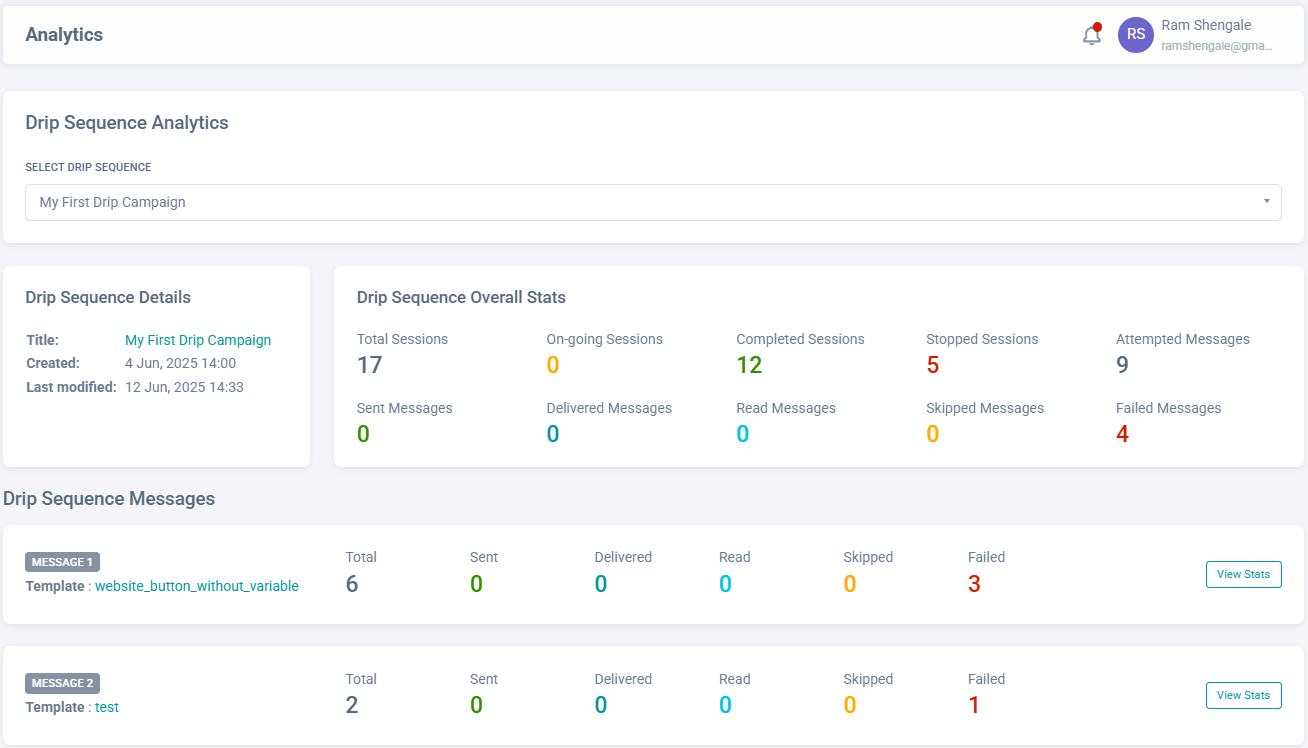
Once you’re here, select any drip sequence from the dropdown at the top. The dashboard will then show how many sessions of that sequence were started, completed, or stopped, along with the performance of individual messages within the sequence.
You can also view delivery reports and activity logs for each message in the sequence. These reports help you troubleshoot delivery issues and confirm whether messages were sent and received successfully.
Best Practices for Sending Effective WhatsApp Campaigns
Now that you know how to create and send WhatsApp campaigns and monitor their performance, let’s go over a few best practices to help you improve engagement while remaining compliant with WhatsApp’s guidelines:
1. Always Get Explicit Opt-In
Before sending any marketing messages, make sure users have clearly agreed to receive them. This can be done using a checkbox on your website or a sign-up form, or by using keywords like “Start” within chat. It is equally important to make it easy for users to opt out of your messages any time, by simply replying with keywords like “STOP” or “Unsubscribe.”
2. Filter and Segment Your Audience
Another important thing to keep in mind is to avoid sending generic messages to all your contacts. Ideally, you should use a WhatsApp CRM to segment contacts based on lists, tags, custom attributes, and Smart Segments, and use dynamic placeholders such as the recipient’s name, order ID, location, and other details to make your campaigns feel more personal.
3. Optimize Timing and Frequency
You should also consider when and how often to send campaigns. Remember, by messaging users too frequently or at inconvenient times, you can increase your chances of being blocked or reported.
To avoid this, you must schedule campaigns for times when your audience is most likely to engage. Also, avoid overwhelming them with too many messages in a short period.
4. A/B Test Your Message Templates
Another effective way to improve your campaign performance is to test different versions of your message templates. Small changes in wording, formatting, images, or call-to-action buttons can often lead to noticeable differences in engagement.
5. Monitor Campaign Analytics Regularly
It’s also important to regularly review your campaign analytics, including delivery, open, click-through, and reply rates, as well as cost and ROI of each campaign. By monitoring these insights, you can identify what’s working, spot potential issues early, and make informed adjustments to improve future campaigns.
Final Thoughts
As you’ve seen throughout this guide, it is possible to send effective WhatsApp marketing campaigns at scale without getting restricted or banned on the messaging app.
However, to do that, you need to follow WhatsApp’s guidelines (such as obtaining user consent), segment your audiences to keep campaigns relevant, and regularly monitor performance to ensure your messages are received well.
Also, if you want to reach thousands of contacts at once, you need access to the official WhatsApp API, which supports high-volume messaging, advanced automation, and third-party integrations.
That’s where WANotifier comes into the picture.
An official Meta Tech Partner, WANotifier provides a comprehensive WhatsApp marketing and automation platform that lets you create, manage, and optimize WhatsApp campaigns without writing any code.
In addition to that, WANotifier enables you to:
- Use your WhatsApp Business App number with the WhatsApp API (using the Coexistence feature)
- Trigger transactional messages from your app or website based on user actions like form submissions, orders, callback requests, etc.
- Capture leads directly from Facebook and Instagram ads and add them to your contact list (learn more about it here)
- Set up no-code chatbots and automations to handle customer queries and requests
- Run automated drip sequences to onboard, nurture, and re-engage users
- Use WhatsApp Flows to collect user data directly inside chat
- Integrate WhatsApp with your website, CRM, e-commerce platforms, and other third-party apps via our WordPress plugin and REST API
- Track message delivery and open rates, bot and drip sequences sessions, analyze Flow responses, and conversions from ad campaigns
- Manage conversations from a shared team inbox (assign chats, track conversations, and respond in real time)
The best part is that, unlike other API providers that charge 12% to 25% markup on messaging charges, WANotifier charges 0% markup. It also offers responsive customer support via email and chat, and step-by-step onboarding assistance across all plans. You can also try WANotifier free for 7 days to explore its features without any upfront cost or commitment.
👉 Sign up today and launch your first WhatsApp marketing campaign within minutes.
Elevate your WhatsApp marketing with WANotifier. Easy to set up. Built to scale. No hidden costs.
Frequently Asked Questions (FAQs)
What is WhatsApp marketing?
WhatsApp marketing refers to the practice of using WhatsApp to communicate with customers, promote products or services, and drive specific actions such as purchases, sign-ups, or bookings. If you’d like to learn more about WhatsApp marketing strategies and how to get started, check out this beginner-friendly guide.
How many WhatsApp marketing messages can I send per day?
The number of marketing messages you can send per day depends on whether you are using the WhatsApp Business App or the WhatsApp Business API.
The WhatsApp Business App allows you to message up to 256 contacts at a time. With the WhatsApp Business API, on the other hand, you can message thousands or even unlimited contacts, depending on your daily messaging limit and account quality rating.
Can I automate WhatsApp marketing campaigns?
Yes, you can automate WhatsApp marketing campaigns using tools like WANotifier, which are built on top of the WhatsApp Business API.
How much do WhatsApp marketing campaigns cost?
The cost of WhatsApp marketing campaigns typically depends on two factors: the platform you use to access the WhatsApp API and the WhatsApp messaging charges.
Note that WhatsApp uses a per-message pricing model (learn more about it here), where businesses are charged for each delivered message template based on the message category (marketing, utility, or authentication) and the recipient’s location.
Now, some platforms also add a 12% to 25% markup on these messaging charges, which can significantly increase overall costs. That’s why it’s important to choose a platform that offer 0% markup on messaging charges, like WANotifier.
What metrics should I track for WhatsApp campaigns?
To measure the success of your WhatsApp campaigns, you should track key performance metrics such as:
- Delivery rate: How many messages were successfully delivered
- Read rate: How many recipients opened the message
- Replies: How many recipients responded to your message
- Campaign cost: the overall cost of sending messages in the campaign
You should also monitor the performance of individual message templates, including their delivery and read rates, to understand which templates generate the most engagement and responses.