If you run an e-commerce business and are looking into the WhatsApp Business API to integrate WhatsApp with your online store to send order notifications and communicate with customers, you’ve probably already seen plenty of information about what it can potentially do.
From order notifications, abandoned cart recovery alerts, and personalized promotional messages, to workflow automation, the possibilities seem limitless. That said, it’s not always clear how you can leverage these capabilities or even get started with the API for your business.
That’s exactly what this guide will help you do.
By the end of it, you’ll know how to access the WhatsApp API and use it to run targeted campaigns, automate conversations and workflows, drive repeat purchases, and more without writing a single line of code!
But first, let’s quickly look at what the WhatsApp Business API really is and how it can benefit your e-commerce store.
What is the WhatsApp Business API?
The WhatsApp Business API is a programmatic solution provided by Meta that allows businesses to communicate with customers at scale.
Unlike the personal WhatsApp app or the WhatsApp Business App, which are designed for one-on-one messaging, the API enables businesses to:
- Send promotional messages to thousands of contacts at once
- Automate follow-ups, reminders, and entire customer journeys on WhatsApp
- Integrate WhatsApp with their website, online stores (Shopify, WooCommerce, etc.), and other third-party apps, and trigger messages based on customer actions, such as order confirmation, cart abandonment, and return requests.
… and do much more.
To learn more about how the WhatsApp API works, check out this comprehensive guide.
What are the Advantages of Using the WhatsApp API for E-Commerce?
Now that you know what the WhatsApp API is, let’s take a closer look at the advantages it offers for e-commerce businesses:
1. Send Order Notifications and More
One of the biggest advantages of using the WhatsApp API is that it allows you to connect your website, e-commerce platform, and trigger automated WhatsApp notifications in response to specific customer actions and events, such as:
- Purchases and form submissions
- Payment confirmations
- Shipping updates
- Return requests
… and more
2. Send Abandoned Cart Recovery Alerts
Once you’ve integrated WhatsApp with your e-commerce store, you can also send automated abandoned cart reminders to customers who leave without completing a purchase.
These reminders can be triggered shortly after a cart is abandoned and can include a direct link back to the cart or details of the products viewed, along with a gentle nudge or limited-time offer to encourage conversion.
3. Run Personalized WhatsApp Campaigns at Scale
The WhatsApp Business API also allows you to message thousands, or even unlimited contacts at once (depending on your phone number’s quality rating).
Additionally, it supports message templates, which can be personalized with customer details, such as name, order ID, previous purchases, and more, so your messages feel more targeted and relevant, even if they’re part of a large marketing campaign.
4. Automate Customer Engagement and Workflows
In addition to sending and receiving messages at scale, the WhatsApp API enables you to automate customer communication and routine workflows, so your team can focus on higher-value tasks.
For example, you can set up auto-replies to instantly answer FAQs, create chatbots to guide customers through different product options or support requests, and build drip sequences to nurture and engage prospects over time.
5. Track Campaign Performance with Detailed Analytics
Finally, the WhatsApp API also provides in-depth analytics that help you track and optimize your WhatsApp campaigns over time.
You can monitor key metrics such as message delivery, open, and click-through rates, and analyze the performance of individual message templates to determine what’s resonating with your customers and make informed improvements.
With a better understanding of the WhatsApp API and its advantages, let’s now look at how to get started with it for your e-commerce store.
How to access the WhatsApp API?
While the WhatsApp Business API offers powerful capabilities for reaching customers at scale and automating workflows, it doesn’t include a built-in interface you can use directly.
To access it and actually use its features, you need to work with a third-party platform that provides the tools and infrastructure required to send messages, run campaigns, and set up automations.
Now, there are many such platforms out there; however, most of them charge a 12% to 25% markup on WhatsApp’s official messaging costs, which can significantly increase your campaign expenses over time.
This is where WANotifier stands out.
WANotifier is an official Meta Tech Partner that offers an all-in-one WhatsApp marketing and automation platform that helps businesses across industries reach and engage customers at scale on WhatsApp.
What truly sets WANotifier apart is its transparent pricing model. The platform charges 0% markup on WhatsApp API usage costs, with direct billing from Meta, so you only pay for what you use.
It also offers best-in-class customer support, step-by-step onboarding assistance for the WhatsApp API, and a 7-day free trial on all paid plans.
To get started with WANotifier and access the WhatsApp API, simply follow the setup guide below:
>> Create your WANotifier account and set up the WhatsApp API
Once your setup is complete, you’ll be taken to your dashboard, where you can start running campaigns, setting up automations, and implementing the use cases covered in the next section.
No code. Minimal setup. Launch your next WhatsApp marketing campaign in minutes!
How to Use WhatsApp API for E-Commerce with WANotifier?
In the following sections, we’ll look at some of the most effective ways to use the WhatsApp API for e-commerce with WANotifier, along with links to comprehensive guides to help you get started:
1) Launch Promotional Campaigns at Scale
Promotional campaigns involve sending a single message or a series of messages to your customers to promote an offer or encourage a specific action, such as:
- Completing a purchase
- Signing up for a service
- Filling out a form or survey
With WANotifier, you can create and send WhatsApp promotional campaigns at scale within minutes. You can also schedule campaigns for peak engagement and personalize them using customer data, so your messages feel more relevant.
Additionally, since WANotifier uses the official WhatsApp API, you can stay fully compliant with WhatsApp’s business messaging policies while reducing the risk of your number being restricted or banned.
To learn how to set up and send promotional campaigns using WANotifier, follow the step-by-step guide below:
>> Send promotional campaigns at scale on WhatsApp
2) Set Up WhatsApp Automations to Nurture and Engage Customers
In addition to running campaigns, you can use WhatsApp automations to follow up with and engage both leads and existing customers.
With WANotifier, you can set up different types of automations, including:
Basic Automations
Basic automations enable you to automate greetings, out-of-office, and delay-in-response messages. You can also set up keywords that let contacts unsubscribe or resubscribe to your messaging lists.
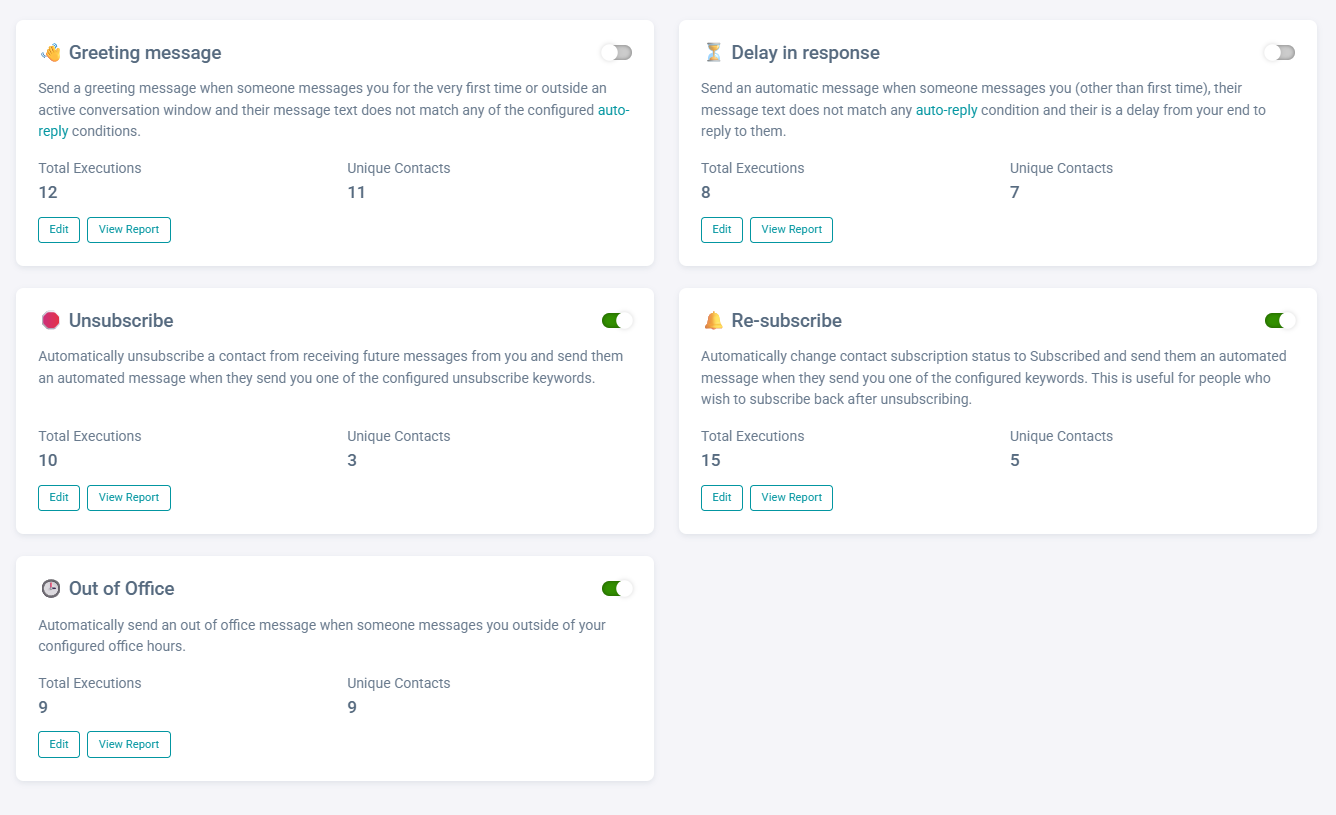
To learn how to set up basic automations using WANotifier, follow the step-by-step guide below:
>> Set up basic automations on WhatsApp
Keyword-Triggered Auto Replies
This feature lets you trigger automated responses based on specific keywords in incoming messages. For example, if someone types “pricing,” you can automatically send your latest pricing details. Similarly, if they write “help” or “interested,” the conversation can be routed to your support or sales team.
Refer to the guide below to create keyword-triggered auto replies:
>> Create keyword-triggered replies on WhatsApp
Chatbots
Chatbots allow you to create interactive conversation flows that guide customers through product discovery, FAQs, or support requests without human intervention.
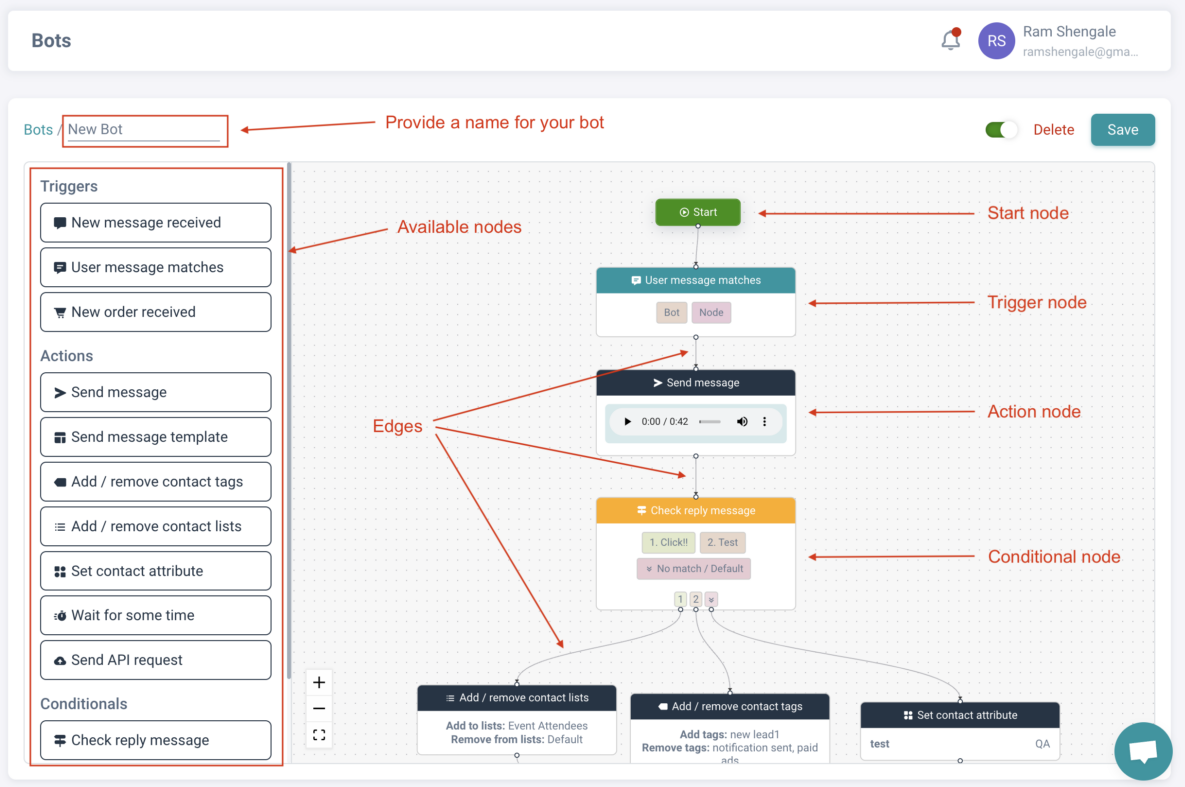
You can learn more about WhatsApp chatbots and how to create them with this beginner-friendly guide:
>> Create WhatsApp chatbots with WANotifier
Drip Sequences
Drip sequences let you send a series of pre-scheduled messages to nurture leads, onboard new customers, or re-engage inactive users over time.
To learn how to create drip marketing campaigns, check out the setup guide below:
>> Set up drip campaigns on WhatsApp
3) Integrate WhatsApp with Your E-commerce Store and Trigger Notifications for Order Confirmations and More
You can integrate WhatsApp with your website, e-commerce platform, and other third-party tools using WANotifier’s integration plugins and REST API to automatically trigger notifications based on customer actions.
For example, our WooCommerce plugin, lets you connect your online store to WhatsApp and automatically send order confirmations, abandoned cart reminders, and other transactional messages, without any coding or technical experience.
To learn more about how to set this up, check out the guides below:
To learn more about our other integration plugins, refer to this page.
4) Create WhatsApp Flows to Collect Customer Details
WhatsApp Flows allow you to create interactive, form-like experiences within WhatsApp to collect custom information without redirecting them to any external links or pages.
You can use WhatsApp Flows for a variety of use cases, such as:
- Lead qualification (e.g., capturing preferences or requirements)
- Feedback collection (e.g., post-purchase surveys or reviews)
… and more
With WANotifier, you can share these flows through campaigns, automations, and your shared team inbox. You can also monitor Flow responses in real time and export them for further analysis.
To learn how to create and use WhatsApp Flows with WANotifier, follow the in-depth guide below:
>> Create and send WhatsApp Flows to your customers
5) Run Click-to-WhatsApp Ads
Click-to-WhatsApp Ads (or CTWAs) are ads run on Facebook and Instagram that, when clicked, take users directly to a WhatsApp chat with your business.
Unlike traditional ads that send users to landing pages or forms, CTWAs bring them straight into WhatsApp, where they can ask questions, explore products, or express interest in your offerings. This makes them especially effective for capturing high-intent customers who are already interested in what your business has to offer.
With WANotifier, you can take your CTWAs a step further by:
- Automatically adding leads who click on your ads to your preferred contact lists
- And organizing them using our built-in WhatsApp CRM
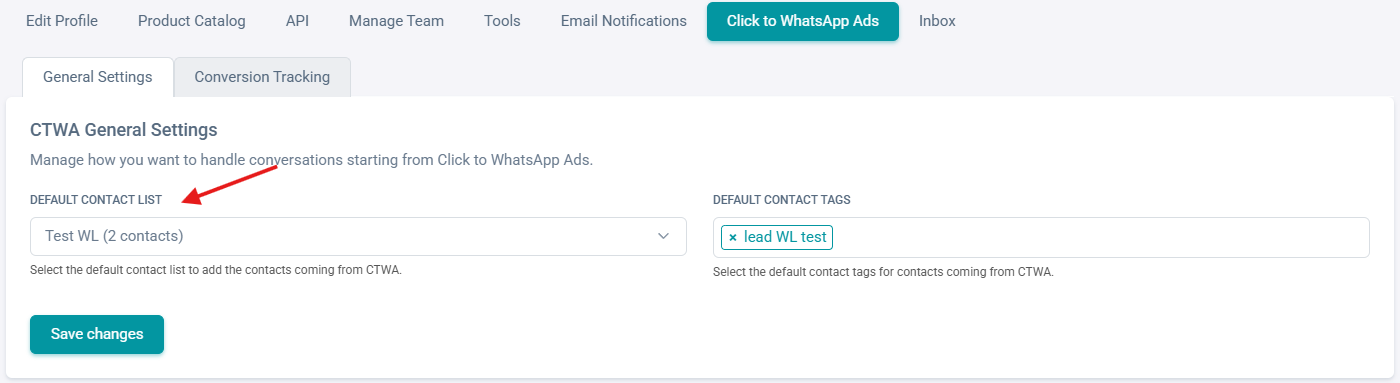
Once you’ve done that, you can use features like campaigns and automations (covered in the next sections) to follow up, nurture, and re-engage these leads.
To learn how to set up Click-to-WhatsApp Ads and generate leads using WANotifier, follow the detailed guide below:
>> Generate leads with click-to-WhatsApp ads
6) Track Lead Conversions and ROI
WANotifier also offers advanced analytics that enable you to track:
- The performance of your WhatsApp campaigns (including message delivery, open, and click-through rates)
- The performance of individual message templates (note that if you’re using the MM API, you can compare your template’s performance against similar templates)
- WhatsApp API usage and messaging costs
- Lead conversions from click-to-WhatsApp ad campaigns (learn more about it here)
- Chatbot, drip sequence sessions, and more.
Best Practices for Using WhatsApp API in E-Commerce
Now that you know how to use the WhatsApp API for your e-commerce business with WANotifier, let’s look at a few best practices to help you get the best results from your efforts.
1. Collect explicit customer opt-ins
WhatsApp requires businesses to obtain explicit consent from customers before sending messages. You can collect this consent through a checkbox on your website, a sign-up form, or by asking users to send a keyword such as “Start” in chat.
This will not only help you stay compliant with WhatsApp’s policies but also ensure you’re engaging with people who are genuinely interested in hearing from your business.
2. Personalize your messages
It’s equally important to personalize your messages using customer data such as name, past purchases, and preferences to tailor your communication.
With WANotifier’s WhatsApp CRM, you can organize and segment your contacts using lists, tags, custom attributes, and dynamic Smart Segments, so that you’re sending more targeted messages rather than generic broadcasts.
3. Maintain a healthy messaging frequency
Another important thing to pay attention to is when and how often you’re sending messages. Remember, if you message users too frequently, they may start ignoring your messages, unsubscribe, or even block and report your number on WhatsApp.
To avoid this, maintain a consistent yet non-intrusive messaging frequency, and experiment with different timings to see what works best for your audience.
4. Balance automation with human touch
While automation helps you stay responsive and efficient, it’s equally important to offer human support when needed. You must always ensure customers can easily connect with a real person, especially for complex queries or situations requiring personalized assistance.
5. Test and optimize campaigns regularly
You must also regularly monitor key campaign metrics, including message delivery, open and click-through rates, and conversions. Use these insights to experiment with different message formats, timing, and content, and refine your strategy based on what resonates most with your audience.
Conclusion
By now, you should have a clear understanding of how to use the WhatsApp Business API for your e-commerce business, from sending order notifications and abandoned cart reminders to running personalized campaigns, setting up automations, collecting customer data in chat, and more.
It’s worth noting that how effectively you can implement all of this depends heavily on the API provider you choose.
Remember, the right API provider can turn WhatsApp into a scalable revenue channel that drives conversions, improves customer experience, and fuels repeat purchases on your store. The wrong one, on the other hand, can leave you dealing with unnecessary markups on messaging charges and a setup that’s difficult to scale in the long run.
With WANotifier, you get 0% markup on WhatsApp’s messaging charges and a transparent pricing model that scales with your business, so you can focus on growth without worrying about hidden costs eating into your margins.
👉 Sign up today and see how WANotifier helps you scale your e-commerce business on WhatsApp.
Elevate your WhatsApp marketing with WANotifier. Easy to set up. Built to scale. No hidden costs.
Frequently Asked Questions (FAQs)
Is the WhatsApp Business API suitable for small e-commerce businesses?
Yes, but it depends entirely on your needs.
If you’re just starting out and handling a small number of conversations, the WhatsApp Business App may be sufficient for your needs. However, if you’re looking to run campaigns, automate communication, or scale your customer interactions, the WhatsApp API might be a better fit.
WhatsApp Business App vs WhatsApp API: Which is better for e-commerce businesses?
The WhatsApp Business App is ideal for small businesses that want to message a limited number of customers at a time (up to 256) and engage in one-on-one conversations with customers.
The WhatsApp API, on the other hand, is better suited for e-commerce businesses that want to send promotional campaigns to thousands of contacts at once, automate workflows, integrate WhatsApp with their e-commerce store and other third-party tools, and collaborate on customer chats using the same phone number.
How can e-commerce businesses use the WhatsApp Business API?
E-commerce businesses can use the WhatsApp API for a wide range of use cases, including:
- Generating leads through Click-to-WhatsApp Ads
- Running promotional campaigns
- Automating follow-ups and customer journeys using chatbots, auto-replies, and drip sequences
- Collecting customer data within chat using WhatsApp Flows
- Integrating their e-commerce store and other tools with WhatsApp to trigger automated messages based on user actions or events
- Analyzing campaign performance and tracking lead conversions from ad campaigns
Can I use the WhatsApp Business API to recover abandoned carts?
Yes, with the WhatsApp API, you can automatically send reminders to customers who abandon their carts, along with product details, images, or even discount offers to encourage them to complete their purchase.
Can the WhatsApp Business API handle customer support for my e-commerce store?
Yes, you can use the WhatsApp API to automate customer support for your e-commerce store to some extent.
For example, you can use auto-replies to handle routine queries and set up chatbots to guide customers through product discovery, capture their preferences, or even register support requests and complaints.
That said, more complex or sensitive queries may still require human intervention, and your setup should ensure that your team can step in when needed and provide a better customer experience.